
Count lines of code in GitHub repositories
Paste a public GitHub repository URL to get files, code, comment, and blank line totals per language. Free, no sign-up, no clone — powered by tokei.
Open source · Powered by tokei · 200+ languagesChromeEdgeFirefox
Browser extension available on desktop. Learn more about the extension
Example report
The report below is a live example. Paste any public repo URL above to analyze yours.
- JavaScript: 63.5%
- Rust: 17.5%
- TypeScript: 16.4%
- JSON: 1%
- CSS: 0.9%
- Other: 0.6%
| JavaScript | 1,477 | 293,727 | 231,46163.5% | 38,456 | 23,810 |
| Rust | 117 | 72,601 | 63,89617.5% | 3,775 | 4,930 |
| TypeScript | 219 | 74,391 | 59,89616.4% | 10,169 | 4,326 |
| JSON | 86 | 3,535 | 3,5271% | 0 | 8 |
| CSS | 88 | 3,828 | 3,2830.9% | 61 | 484 |
| TSX | 15 | 1,591 | 1,3330.4% | 153 | 105 |
| HTML | 23 | 438 | 4160.1% | 9 | 13 |
| Shell | 19 | 531 | 316<0.1% | 118 | 97 |
| TOML | 14 | 247 | 223<0.1% | 4 | 20 |
| SVG | 7 | 10 | 10<0.1% | 0 | 0 |
| Other (1 more) | 68 | 8,910 | 00% | 6,360 | 2,550 |
| Total | 2,133 | 459,809 | 364,361 | 59,105 | 36,343 |
Browser Extension
GitHub SLOC & code statistics in the repo sidebar.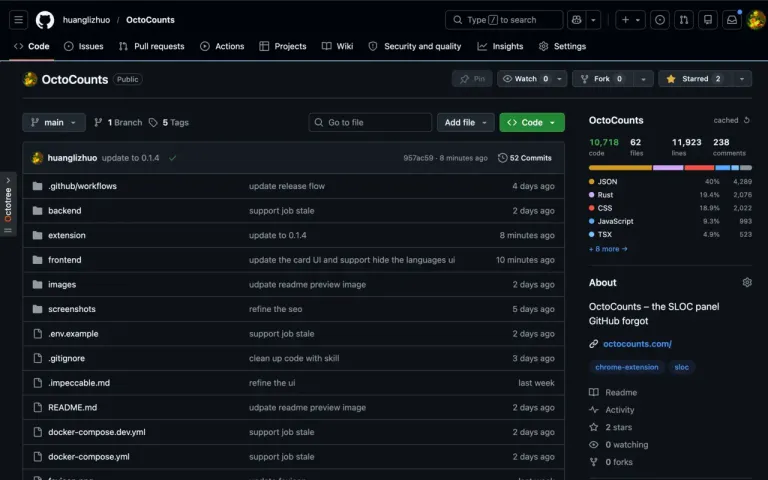
OctoCounts – GitHub SLOC & Code Statistics
Open a GitHub repository and OctoCounts adds a compact SLOC card to the repo sidebar. Click the card for the full panel with totals, language breakdown, and cached stats.
- Repo sidebar card
- Language table
- Local cache
Browser extension available on desktop. Learn more about the extension
public report activity, aggregate only
Tools
every card opens the real tool, ready to runLive README badges that link back to a live report.
[](...)CompareTwo repositories side by side: totals, language mix, deltas.
open /compare?left=…&right=…Ref diffOne repository across two refs: growth between releases or branches.
open /diff?repo=…&base=v1.0&head=v1.1APIAnalyze, jobs, reports, badge, SEO, and stats endpoints.
GET https://api.octocounts.com/api/statsCLIRun OctoCounts from a terminal or CI script; text or JSON output.
npx octocounts https://github.com/owner/repo --jsonGitHub ActionComment SLOC changes on pull requests, inside review workflows.
uses: huanglizhuo/OctoCounts/action@mainMCP serverSLOC reports for agent workflows and developer assistants.
npx octocounts-mcpUse Cases
common reasons developers count linesEvaluate a dependency
Before adopting a new open source library, check its actual size, not just file count. A 50-file repo might be 20k lines of dense C++ or 500 lines of glue code. SLOC gives you the real picture before you commit to a dependency.
Estimate project scope
Clients and stakeholders ask how big a codebase is. SLOC gives you a solid number before a review or audit: 12k lines across 8 languages, 89% code, 4% comments.
Compare forks or alternatives
Paste two repos and compare language breakdowns side by side. See how much a fork diverged, or how different two implementations of the same spec really are.
How It Works
archive in, tokei report outResolve
OctoCounts validates the public GitHub URL and resolves the requested branch, tag, or commit SHA to a pinned commit hash via the GitHub API. Counts are reproducible for the same commit SHA, engine version, and effective counting rules. A branch or tag can move to a new commit, so its live report can change.
Count
The Rust backend downloads a compressed archive, not a full git clone. It skips generated folders like node_modules, vendor, and .git, then tokei counts every source file in a background worker queue.
Cache
Reports are cached by repository, commit SHA, tokei version, and effective counting rules. A matching retained entry avoids another download and count; expired or missing entries require analysis. Re-run requests a fresh analysis, subject to rate limits. The extension can reuse retained local results.
Frequently Asked Questions
about SLOC, OctoCounts, and exportsWhat is SLOC?
SLOC stands for Source Lines of Code. It is a software metric used to measure the size of a program by counting the lines in its source code. Unlike raw line count, SLOC distinguishes between code lines (actual instructions the compiler or interpreter processes), comment lines (documentation and explanations), and blank lines (whitespace). This breakdown matters because a 10,000-line file that is 40% comments tells a different story than one that is 95% code.
Developers use SLOC to describe project size, not complexity, compare codebases when evaluating dependencies, scope billing and audit work, and communicate repository size to stakeholders who may not read code. OctoCounts reports SLOC at two levels: per programming language and as aggregate totals across the entire repository. The underlying counter is tokei, an open-source line counter written in Rust that processes files in parallel.
Why use OctoCounts instead of cloning and running tokei locally?
OctoCounts downloads a compressed archive tarball rather than a full git clone with history. A full git clone transfers commit, tree, and blob objects in the repository's history; for a long-lived project that can mean hundreds of megabytes or gigabytes of data even if the current source tree is small. OctoCounts fetches only the archive of the working tree at the requested ref, so the transfer covers the current source tree instead of the repository's entire history.
Additionally, there is nothing to install. No git, no Rust toolchain, no tokei binary. Just paste a GitHub URL into the web app or install the browser extension once. Results are cached by commit SHA, tokei version, and effective counting rules. A matching retained cache entry avoids another download and count; expired entries require a new analysis. This makes OctoCounts especially useful for quickly evaluating dependencies or unfamiliar repositories without setting up a local environment.
Does OctoCounts have a browser extension?
Yes. OctoCounts has browser extensions for Chrome, Edge, and Firefox, all named OctoCounts – GitHub SLOC & Code Statistics. Install from the Chrome Web Store, Microsoft Edge Add-ons, or Firefox Add-ons to add a compact SLOC card directly to GitHub repository sidebars. The card appears automatically on any public repository page and shows the total line count and analysis status. Clicking the card opens the full panel, which displays files, total lines, code lines, comment lines, and blank lines per language, the same breakdown as the web app.
The extension can reuse retained local results on repeat visits to the same repository and ref; a missing or expired entry requires a new request. You can configure the auto-analyze setting to fetch counts immediately on page load, or trigger analysis manually. The placement setting controls where the card appears in the GitHub sidebar. No GitHub account or API token is required. The extension source code is publicly available on GitHub.
Is OctoCounts free to use?
Yes. OctoCounts is completely free to use for public GitHub repositories. There is no account required, no API key, no sign-up, and no sign-up fee. The default analysis rate limit is 5 requests per minute per IP, with a burst of 10; deployments may configure different limits. Both the web app and the browser extensions are free with no premium tier. The backend is open source, written in Rust using the Axum framework, and the frontend is written in React with TypeScript. If you prefer, you can self-host the entire stack; the source code is available on GitHub at github.com/huanglizhuo/OctoCounts.
OctoCounts intentionally analyzes public repositories only. Analysis does not require GitHub account access, does not support private repositories, and does not accept source-code uploads. OctoCounts has no advertising. Chrome builds offer optional GitHub sign-in for star history; login and token handling are explained in the privacy policy.
What programming languages does OctoCounts support?
OctoCounts uses tokei for language detection, which supports over 200 programming languages and file types. Languages covered include Rust, Python, JavaScript, TypeScript, Go, Java, C, C++, C#, Ruby, Swift, Kotlin, PHP, Scala, Haskell, Elixir, Erlang, Clojure, F#, Lua, R, Julia, Dart, Perl, Shell, Bash, PowerShell, HTML, CSS, SCSS, SQL, GraphQL, Dockerfile, YAML, JSON, TOML, XML, Markdown, and many more.
tokei detects languages primarily by file extension, with fallback to shebang lines and content-based detection for ambiguous files. It handles multi-language files and supports configuration to exclude specific directories such as node_modules, vendor, or build output folders. OctoCounts automatically skips heavy generated folders before passing the archive to tokei, these are rule-based exclusions, not proof that all remaining source is human-written.
Can I export the source line count results?
Yes. OctoCounts supports three export formats available from the action buttons below the analysis results. Plain text copies a formatted table to your clipboard, showing language name, file count, total lines, code lines, comment lines, and blank lines in a column-aligned layout suitable for pasting into README files, GitHub issues, or documentation. JSON downloads the full structured report including per-language stats and aggregate totals, formatted for use in scripts, CI pipelines, or other tools that consume JSON.
PNG downloads a 1200 × 630 image card showing the language breakdown, suitable for sharing on Twitter, LinkedIn, GitHub repository READMEs, or portfolio pages. The PNG card uses the same dark and light color palette as the web app and includes the repository name, total line count, and a language breakdown. All three formats are generated client-side from the analysis data already loaded in your browser, so no additional server request is needed.
Does OctoCounts support private repositories?
OctoCounts supports public GitHub repositories only. Analysis does not require GitHub account access, does not support private repositories, and does not accept source-code uploads. If you need to count lines of code in a private repository, run tokei locally. Download tokei from github.com/XAMPPRocky/tokei, clone your repository, and run tokei in the repository root. tokei is free, open source, and produces the same output format that OctoCounts uses.